
一、介绍
作者:fyupeng
技术专栏:☞ https://github.com/fyupeng
分布式博客项目地址:☞ https://github.com/fyupeng/distributed-blog-system-api
留给读者
工作中难免会遇到数据导出的问题,最简单的解决方案就是引入阿里的EasyExcel来解决。
二、代码
实体类
1
2
3
4
5
6
7
8
9
10
11
12
13
14
public class Person {
private String seqNumber;
private String name;
private String hobby;
}实现代码
1
2
3
4
5
6
7
8
9
10
11
12
13
14
15
16
17
18
19
20
21
22
23
24
25
26
27
28
29
30
31
32
33
34
35
36
37
38
39
40
41
42
43
44
45
46
47
48
49
50
51
52
53
54
55
56
57
58
59
60
61
62
63
64
65
66
67
68
private final static DateTimeFormatter DATE_TIME_FORMAT = DateTimeFormatter.ofPattern("yyyy-MM-dd");
public static void export(HttpServletRequest request, HttpServletResponse response) throws IOException {
Person person = new Person();
person.setName("小明");
person.setHobby("苹果");
List<Person> list = new ArrayList<>();
list.add(person);
String fileName = "人.xlsx";
SXSSFWorkbook sheets = exportExcel(list);
response.setContentType("application/octet-stream;charset=UTF8");
response.setHeader("Content-Type", "application/vnd.ms-excel");
fileName = URLEncoder.encode(fileName, "UTF-8") + DATE_TIME_FORMAT.format(LocalDate.now());
response.setHeader("Content-Disposition", "attachment;filename=" + fileName + ".xlsx");
response.addHeader("Cache-Control", "no-cache");
OutputStream out = response.getOutputStream();
sheets.write(out);
out.flush();
out.close();
}
private static SXSSFWorkbook exportExcel(List<Person> moduleList) {
// 标题
String[] title = {"序号", "名称", "爱好"};
// 创建一个工作薄
SXSSFWorkbook workbook = new SXSSFWorkbook();
// 创建一个工作表 sheet
SXSSFSheet sheet1 = workbook.createSheet("Sheet1");
// 创建第二行
Row row = sheet1.createRow(1);
// 创建单元格
Cell cell = null;
// 创建表头
for (int i = 0; i < title.length; i++) {
cell = row.createCell(i);
// 设置样式
CellStyle cellStype = workbook.createCellStyle();
cellStype.setAlignment(HorizontalAlignment.CENTER); // 设置字体居中
// 设置字体
Font font = workbook.createFont();
font.setFontHeightInPoints((short) 13);
cellStype.setFont(font);
cell.setCellStyle(cellStype);
cell.setCellValue(title[i]);
}
// 从第三行开始追加数据
for (int i = 2; i < (moduleList.size() + 2); i++) {
// 创建第i行
Row nextRow = sheet1.createRow(i);
for (int j = 0; j < 3; j++) {
Person person = moduleList.get(i - 2);
Cell cell2 = nextRow.createCell(j);
if (j == 0) {
cell2.setCellValue(String.valueOf(i - 1));
} else if (j == 1) {
cell2.setCellValue(person.getName());
} else if (j == 2) {
cell2.setCellValue(person.getHobby());
}
}
}
return workbook;
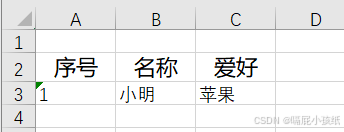
}展示效果
三、总结
生活总能给你带来惊喜,工作中总结未尝不是?